เปิดระบบของ Charlie Hills: 17 Claude Skills ที่ทำงาน 350k followers และ 100 ล้านวิวต่อปี เปิด open source ทั้งหมดใต้ MIT
Charlie Hills เปิด source ระบบ Claude Skills 17 ตัวที่ใช้ขับ operation ของตัวเอง 350k followers ทั่ว LinkedIn Instagram Substack X YouTube พร้อมยอด view ราว 100 ล้านครั้งต่อปี ออกมาทั้งหมดใต้ MIT license บทความนี้แกะดู architecture ลึก ๆ ของระบบนี้และดึง 5 pattern ที่ใช้กับงานของตัวเองได้
ในขณะที่ครีเอเตอร์ระดับ 350,000 ผู้ติดตามส่วนใหญ่มักเลือกขายระบบเบื้องหลังเป็นคอร์สราคาแพง Charlie Hills กลับเลือกเส้นทางที่ต่างออกไป โดยการ เปิดซอร์สโค้ดระบบ Claude Skills ทั้งหมด 17 ตัว ภายใต้ MIT License ให้ทุกคนนำไปใช้งานได้ฟรี นี่คือระบบที่เขาใช้ขับเคลื่อนคอนเทนต์บน LinkedIn, Instagram, Substack, X และ YouTube ซึ่งสร้างยอดวิวกว่า 100 ล้านครั้งต่อปี โดยมีจุดเริ่มต้นมาจาก MarTech AI Newsletter ที่ เผยแพร่รายสัปดาห์บน Substack
สิ่งที่ทำให้ Repository นี้โดดเด่น ไม่ใช่แค่การแจกชุดคำสั่ง Prompt แต่คือ สถาปัตยกรรมระบบ (System Architecture) ที่ครอบคลุมตั้งแต่การจัดการ Dependency ระหว่าง Skill, การแชร์สถานะกลาง (Shared State), ไปจนถึงกฎเกณฑ์ในการตัดสินใจว่า Skill ใดควรทำงานในจังหวะไหน บทความนี้จะพาทุกคนไปแกะโครงสร้างเบื้องลึก พร้อมสรุป 5 รูปแบบสถาปัตยกรรมหลักที่นักพัฒนาและ Builder สามารถนำไปประยุกต์ใช้กับ Agent ของตัวเองได้ทันที โดยอิงจากไฟล์ SKILL.md ทั้ง 17 ตัวใน repo charlie947/social-media-skills
ภาพรวม: 17 Skills 6 หมวดหมู่ ใน 1 Pipeline
ระบบของ Charlie ประกอบด้วย 17 Skill แบ่งออกเป็น 6 หมวดหมู่ แต่ละ Skill อยู่ในรูปแบบไฟล์ Markdown ตามมาตรฐาน Anthropic Skills (มี Frontmatter กำหนด name กับ description และตามด้วยบอดี้ของคำสั่ง)
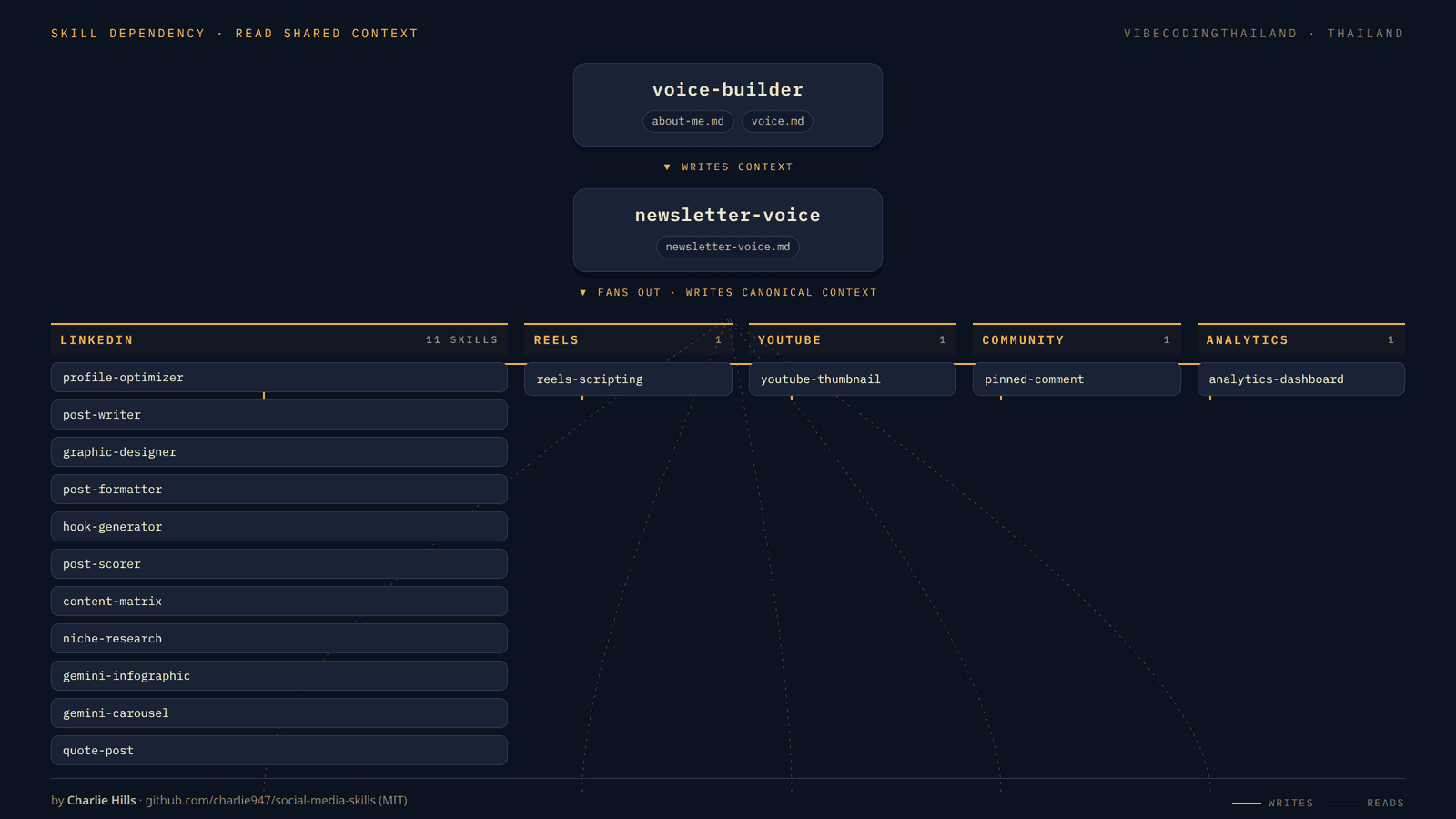
การทำงานจะเริ่มต้นจากจุดศูนย์กลางเพียงจุดเดียวคือ voice-builder ซึ่งจะสร้างไฟล์ข้อมูลกลาง 2 ไฟล์ (about-me.md และ voice.md) เก็บไว้ที่ Root ของโปรเจกต์ จากนั้น newsletter-voice จะเข้ามารับช่วงต่อเพื่อสร้าง newsletter-voice.md เป็นไฟล์ต้นทางหลัก (Canonical Source) แล้วจึงกระจายงาน (Fan-out) ไปยังอีก 15 Skill ที่เหลือตามแต่ละช่องทาง
หมวดหมู่ทั้ง 6 ประกอบด้วย:
- Voice Foundation (2 Skills):
voice-builderและnewsletter-voiceทำหน้าที่เป็นรากฐานของน้ำเสียงที่ทุก Skill ต้องใช้อ้างอิง - LinkedIn (11 Skills):
profile-optimizer,post-writer,graphic-designer,post-formatter,hook-generator,post-scorer,content-matrix,niche-research,gemini-infographic,gemini-carouselและquote-postหมวดนี้มีจำนวนมากที่สุดเพราะเป็นแพลตฟอร์มหลักของเขา - Instagram Reels (1 Skill):
reels-scriptingใช้สำหรับดึงข้อมูลและวิเคราะห์วิดีโอผ่าน Apify และ Gemini Flash - YouTube (1 Skill):
youtube-thumbnailแปลงหัวข้อคลิปเป็น Prompt สำหรับสร้างภาพหน้าปก - Community (1 Skill):
pinned-commentสร้างคอมเมนต์ปักหมุดสไตล์มีมพร้อมภาพประกอบ - Analytics (1 Skill):
analytics-dashboardอ่านข้อมูล Export จาก LinkedIn เพื่อสร้างหน้าเว็บแดชบอร์ดด้วย React
โครงสร้างแบบนี้ทำให้ชิ้นงานทั้งหมด ไม่ว่าจะเป็นโพสต์ บทพูดวิดีโอ หรือคอมเมนต์ สื่อสารออกมาด้วย "น้ำเสียงเดียวกัน" เพราะทุก Skill อ่าน Context กลางจากแหล่งเดียวกันก่อนเริ่มงานเสมอ
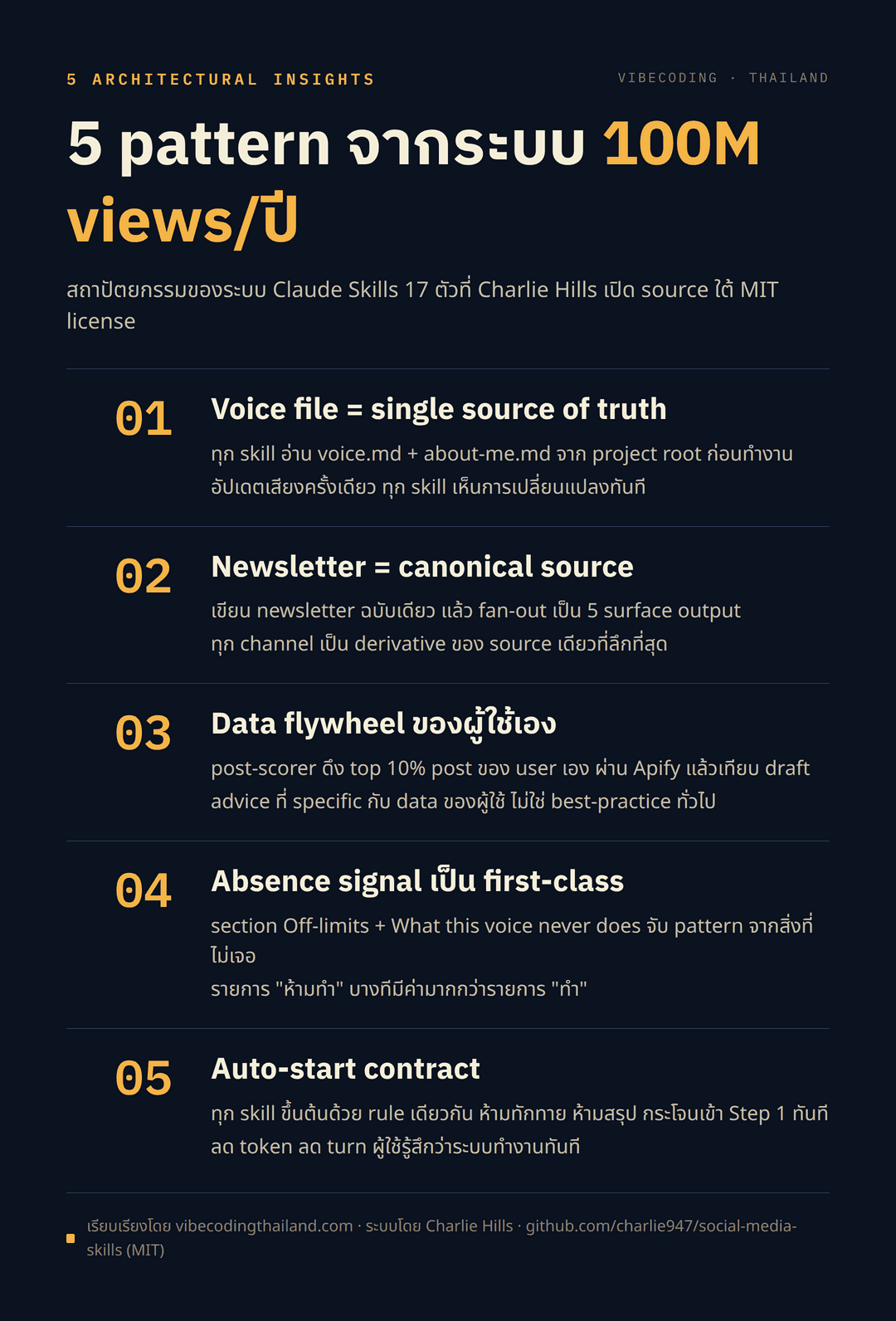
1. Voice file = แหล่งข้อมูลกลาง (Single Source of Truth)
หัวใจสำคัญข้อแรกคือการแยก "ตัวตนของผู้เขียน" ออกจาก "ตัวเนื้องาน" อย่างชัดเจน Skill voice-builder จะทำงานเพียงครั้งเดียวตอนเริ่มโปรเจกต์ โดยใช้ Tool AskUserQuestion สัมภาษณ์ข้อมูล 6 ด้าน ได้แก่ ชื่อกลุ่มเป้าหมาย, เสาหลักของเนื้อหา (Topic Pillars), มุมมองเฉพาะตัว (POV), คำมั่นสัญญาของแบรนด์ และข้อห้าม จากนั้นจะขอตัวอย่างงานเขียน 3 ถึง 5 ชิ้นมาวิเคราะห์ แล้วบันทึกผลออกมาเป็น 2 ไฟล์ตามที่ระบุใน voice-builder SKILL.md:
about-me.md: สรุปว่าผู้เขียนคือใคร กลุ่มเป้าหมายคือใคร และมุมมองที่แตกต่างคืออะไรvoice.md: บันทึกโปรไฟล์น้ำเสียง จังหวะการแต่งประโยค รูปแบบการพาดหัว วลีประจำตัว และที่สำคัญที่สุดคือส่วน Off-limits ซึ่งระบุชัดเจนว่า "น้ำเสียงนี้จะไม่มีวันทำอะไร"
Skill อื่นๆ ทั้งหมดในระบบจะมีกฎเดียวกันตั้งไว้ตั้งแต่บรรทัดแรกว่า ให้ตรวจสอบและอ่านไฟล์ about-me.md กับ voice.md ก่อนเสมอ หากไม่พบไฟล์ ระบบจะหยุดทำงานทันทีและแจ้งให้ผู้ใช้รัน voice-builder เสียก่อน
การใช้ Filesystem ในโปรเจกต์เป็น Shared State มีข้อดี 3 ประการ:
- ไม่ต้องคอยป้อนข้อมูลตัวตนซ้ำๆ ในทุก Prompt เพราะ Skill จะหยิบไฟล์ไปอ่านเอง
- ผลงานทุกชิ้นคงเอกลักษณ์ของน้ำเสียงได้อย่างแม่นยำ ไม่หลุดกรอบ
- เมื่อแก้ไขไฟล์
voice.mdเพียงครั้งเดียว ทุก Skill จะรับรู้การเปลี่ยนแปลงทันทีโดยไม่ต้องแก้โค้ดของ Skill เลย
2. Newsletter = ต้นฉบับกลางสำหรับกระจายสู่ทุกช่องทาง
ถัดจากไฟล์ระบุน้ำเสียง Charlie วาง Newsletter ให้เป็น "ต้นฉบับหลัก (Canonical Source)" สำหรับนำไปแปลงเป็นคอนเทนต์ในช่องทางอื่นๆ โดยไม่ต้องเริ่มเขียนใหม่จากศูนย์ในแต่ละแพลตฟอร์ม
ตัวอย่างเช่นใน reels-scripting ตัวคำสั่งจะถามผู้ใช้โดยตรงว่า:
"What's the topic from your newsletter you want to repurpose into this Reel? Paste the relevant newsletter section, or type the core idea in a sentence."
ระบบบังคับให้การทำวิดีโอต้องต่อยอดมาจากหัวข้อใน Newsletter ที่เขียนไว้แล้วเท่านั้น ทำให้การลงแรงเขียน Newsletter เพียงฉบับเดียว สามารถแตกกิ่งออกไปเป็นผลงานใน 5 แพลตฟอร์มได้อย่างสอดคล้องกัน โดยใจความหลักไม่ขัดแย้งกันเอง
ไฟล์ newsletter-voice.md รองรับทั้งการสร้างจากตัวอย่าง Newsletter เดิม 2 ถึง 3 ฉบับ หรือเลือกปรับแต่งจาก 6 รูปแบบแม่แบบ (Data Tutorial, Contrarian Essay, Case Study, Curated Digest, Personal Essay, Interview) ให้เข้ากับ voice.md ที่มีอยู่
3. Data Flywheel: ประเมินคะแนนเทียบกับผลงาน Top 10% ของตัวเอง
ในบรรดา Skill ทั้งหมด ตัวที่มีความซับซ้อนเชิงเทคนิคสูงสุดคือ post-scorer ซึ่งไม่ได้นำงานเขียนไปเทียบกับ "สูตรสำเร็จทั่วไป" (เช่น ต้องสั้น หรือต้องใช้ตัวเลข) แต่เทียบกับ ประวัติโพสต์ที่ทำผลงานได้ดีที่สุด (Top 10%) ของผู้ใช้คนนั้นเอง
ขั้นตอนการทำงานของ post-scorer:
- สอบถามผู้ใช้ว่าจะให้ดึงข้อมูลจริง ใช้ข้อมูลอ้างอิง หรือข้ามขั้นตอนนี้
- หากเลือกดึงข้อมูล ระบบจะเรียก Apify Actor เพื่อดึงโพสต์ล่าสุด 100 รายการของผู้ใช้
- คำนวณคะแนน Engagement จากสูตร
reactions + comments × 3แล้วคัดเลือกกลุ่ม Top 10% ออกมาวิเคราะห์แพทเทิร์น 6 ด้าน ได้แก่ รูปแบบ Hook ที่ได้ผลดี, ความยาวเฉลี่ย, โครงสร้างเนื้อหา, การวาง Call to Action, หมวดหมู่หัวข้อ และจังหวะของประโยค - นำแพทเทิร์นเฉพาะตัวที่ได้มาใช้เป็นเกณฑ์ให้คะแนนร่างโพสต์ใหม่
เกณฑ์การให้คะแนนแบ่งเป็น 5 ด้าน ด้านละ 10 คะแนน รวม 50 คะแนน โดยมีเงื่อนไขว่าคะแนนในแต่ละด้านจะไม่เกิน 8 ยกเว้นร่างโพสต์นั้นจะตรงกับสถิติของกลุ่ม Top 10% อย่างแท้จริง ทำให้คำแนะนำที่ได้มีความเฉพาะเจาะจงกับผู้ใช้คนนั้น เช่น ระบบอาจแนะนำว่า "โพสต์ Top 10% ของคุณใช้ Hook แบบตัวเลขถึง 42% แต่ร่างนี้ใช้แบบคำถามซึ่งในอดีตได้ผลเพียง 12% จึงควรปรับเป็นสถิติแทน"
4. Absence Signal: กำหนดสิ่งที่เป็น "ข้อห้าม" ให้ชัดเจน
จุดเด่นสำคัญในไฟล์ voice.md คือส่วน Off-limits และ What this voice never does ซึ่งเกิดจากการสังเกตสิ่งที่ "ไม่ปรากฏ" ในตัวอย่างงานเขียนจริง ไม่ใช่แค่การหยิบรายการคำต้องห้ามทั่วไปมาใส่
ตัวอย่างเช่น ในขั้นตอนวิเคราะห์ของ voice-builder ระบบจะตรวจสอบ 4 มิติ:
- คำ เครื่องหมายวรรคตอน หรือโครงสร้างประโยคที่ไม่เคยปรากฏเลยในตัวอย่าง
- รูปแบบ Hook ที่ผู้เขียนไม่เคยใช้
- โทนเสียงที่ไม่เคยใช้
- โครงสร้างการเล่าเรื่องที่ผู้เขียนหลีกเลี่ยง
ปัญหาของคอนเทนต์ที่สร้างด้วย AI ส่วนใหญ่มักไม่ใช่การขาดข้อมูล แต่คือการใส่สิ่งแปลกปลอมที่ผู้เขียนไม่เคยใช้ เช่น การใส่เครื่องหมายวรรคตอนที่ไม่คุ้นเคย คำเชื่อมที่ดูเป็นทางการเกินไป หรือคำลงท้ายที่ไม่เป็นธรรมชาติ การระบุสิ่งที่ "ห้ามทำ" ไว้อย่างชัดเจนในไฟล์น้ำเสียง จึงทำหน้าที่เป็นรั้วกั้น (Guardrails) ที่ควบคุมให้ผลลัพธ์เป็นธรรมชาติอยู่เสมอ
5. Auto-start Contract: เข้าสู่การทำงานทันทีโดยไม่ต้องถามซ้ำ
Skill ทุกตัวในระบบจะเริ่มต้นด้วยข้อกำหนดสำคัญคือ CRITICAL: Auto-start on load ตัวอย่างคำสั่งจาก voice-builder:
The moment this skill is loaded, installed, uploaded, or triggered, you MUST immediately run Step 1 below. This means your very next message to the user is the interview questions. Nothing else.
คำสั่งนี้กำหนดชัดเจนว่า ห้าม AI สรุปหน้าที่ของ Skill ห้ามอธิบายการทำงาน และห้ามถามผู้ใช้ว่าจะให้เริ่มเลยหรือไม่ แต่ให้เริ่มทำงานในขั้นตอนแรกทันที
สาเหตุที่ต้องกำหนดไว้เช่นนี้ เพราะโมเดลภาษาทั่วไปมักถูกฝึกให้ตอบรับอย่างสุภาพและถามยืนยันก่อนเริ่มงาน ซึ่งทำให้เสียรอบการทำงาน (Turn) และสิ้นเปลือง Token โดยไม่จำเป็น การใช้ Auto-start Contract ช่วยลดความซ้ำซ้อน ทำให้ผู้ใช้ได้รับคำถามหรือชิ้นงานแรกในทันทีที่เรียกใช้
6. รูปแบบการออกแบบเพิ่มเติมที่น่าสนใจ
นอกจาก 5 แกนหลักข้างต้น ยังมีเทคนิคการออกแบบที่แทรกอยู่ในระบบอีกหลายจุด:
- Surface-aware Output: ใน
content-matrixระบบจะปรับรูปแบบผลลัพธ์ตามสภาพแวดล้อมที่รันอยู่ เช่น หากรันบน Claude.ai จะแสดงเป็น Interactive Chart Widget แต่ถ้ารันบน Claude Code จะบันทึกเป็นไฟล์ Markdown ลงโฟลเดอร์ให้ทันที - การสร้าง Prompt ส่งต่อให้เครื่องมืออื่น: หลาย Skill ในระบบทำหน้าที่สร้าง Prompt ที่มีความละเอียดสูงเพื่อนำไปวางในเครื่องมือเฉพาะทาง เช่น ส่งต่อไปให้ Gemini สร้างภาพ Infographic หรือภาพปก YouTube สะท้อนว่า Skill ที่ดีไม่จำเป็นต้องทำทุกอย่างจนจบในตัว แต่สามารถส่งต่องานคุณภาพไปยังเครื่องมือที่เหมาะสมได้
- QA Loop ภายในตัว: ใน
reels-scriptingมีขั้นตอนการตรวจทานตัวเอง (Self-scoring) ตามกฎที่กำหนดไว้ หากคะแนนไม่ถึงเกณฑ์ที่ตั้งไว้ ระบบจะต้องปรับแก้และตรวจสอบซ้ำจนผ่านก่อนจึงจะส่งมอบผลลัพธ์ให้ผู้ใช้
7. บทเรียนที่นำไปปรับใช้ตามสายงาน
- สำหรับนักพัฒนา AI Agent: พิจารณาแปลงข้อมูลบริบทที่ต้องใช้วนซ้ำ เช่น ตัวตน กฎเกณฑ์ หรือสไตล์ไกด์ ให้กลายเป็นไฟล์ในโฟลเดอร์ของโปรเจกต์แทนการส่งใน Prompt ทุกครั้ง และใส่คำสั่งตัดการถามยืนยันเพื่อให้ Agent เริ่มทำงานได้ทันที
- สำหรับทีมคอนเทนต์และการตลาด: สร้างต้นฉบับหลักที่มีความลึกและสมบูรณ์เพียงหนึ่งชิ้น แล้วใช้เป็นแกนในการกระจายออกไปเป็นคอนเทนต์ในช่องทางต่างๆ เพื่อให้สารที่สื่อสารออกไปมีความเป็นเอกภาพ
- สำหรับผู้เขียน Prompt: ให้ความสำคัญกับการระบุ "สิ่งที่ไม่ควรทำ" ให้ชัดเจนพอๆ กับ "สิ่งที่ต้องการ" และหากต้องการสร้างระบบประเมินผล ให้เทียบกับข้อมูลสถิติที่ประสบความสำเร็จจริงของโปรเจกต์นั้นๆ
8. การติดตั้งและแหล่งข้อมูล
ระบบ Claude Skills ทั้ง 17 ตัวเปิดให้ใช้งานภายใต้ MIT License สามารถคัดลอก ดัดแปลง และนำไปใช้ในเชิงพาณิชย์ได้ฟรี
วิธีการติดตั้งสามารถเลือกได้หลายรูปแบบ เช่น ติดตั้งผ่าน Marketplace ของ Claude Code, โคลน Repository ไปไว้ในโฟลเดอร์ Skills ของระบบ, หรืออัปโหลดไฟล์เข้าไปใน Claude Desktop สำหรับ Skill บางตัวที่มีการวิเคราะห์ภายนอก เช่น การดึงสถิติหรือวิเคราะห์วิดีโอ ผู้ใช้จะต้องเตรียม API Key ของบริการที่เกี่ยวข้อง (เช่น Apify หรือ Google AI) เพิ่มเติม
ศึกษาโค้ดและรายละเอียดทั้งหมดได้ที่ github.com/charlie947/social-media-skills และติดตามบทความต้นฉบับของ Charlie Hills ได้ทาง charliehills.substack.com
ชอบเรื่องแนวนี้ มีอีบุ๊คฟรีให้อ่านต่อ
สร้าง Claude Skill แบบไม่ต้องรู้โค้ด คู่มือสร้าง Claude Skill ของคุณเองด้วยการคุยกับ Claude Code เป็นภาษาไทย
กดสมัครแล้วเราจะส่งเทคนิค AI และของแจกใหม่ๆ ให้ทางอีเมล เลิกรับได้ตลอด
สร้าง AI Automation Pipeline ทุกแบบ ด้วย Agents และ Skills
ปูจากพื้นฐาน prompt, context และ cost ไปจนปั้น Skill สั่ง Agent กับ Sub-agent แล้วต่อทุกอย่างเป็น pipeline อัตโนมัติที่ออกแบบเองได้ ดูฟรี 7 บทก่อนตัดสินใจ