Claude Code session, context, /compact, /clear ทำงานยังไงจริงๆ ฉบับ dev ไทยใช้ทุกวัน
เปิด docs ของ Anthropic ทั้ง 6 หน้า เล่าใหม่ให้ dev ไทยเข้าใจ session, context, /compact, /clear ในรอบเดียว เลือกใช้ถูกตัวไม่ต้องเดา
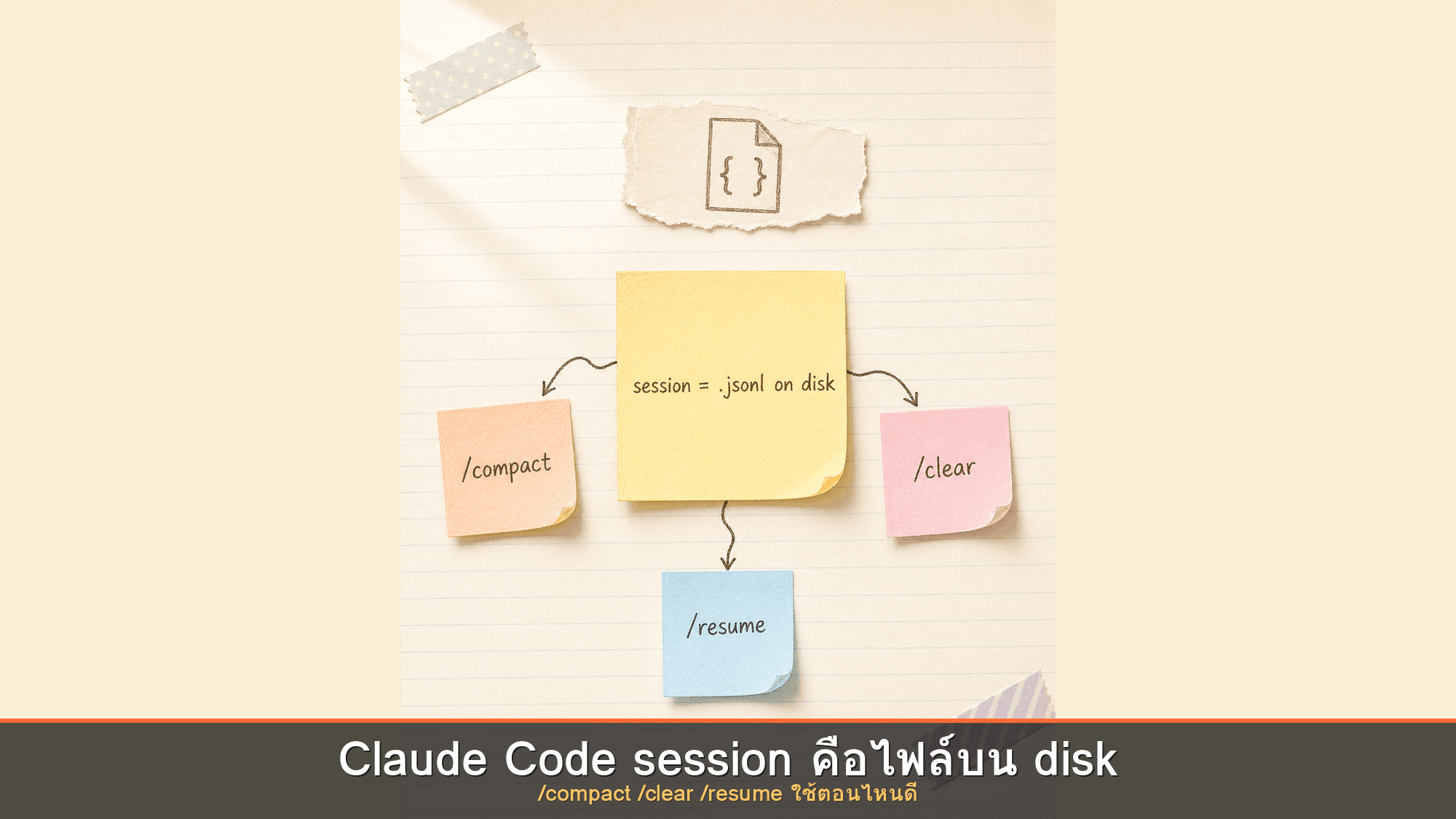
เวลาที่คุณนั่งเขียนโค้ดกับ Claude Code ไปได้สักหนึ่งชั่วโมง คุยโต้ตอบไปหลายสิบรอบ จู่ๆ Claude ก็เริ่มลืมไฟล์ที่เพิ่งเปิดอ่านไปเมื่อครู่ ประมวลผลช้าลง และหน้าจอ Terminal ก็แจ้งเตือนว่าบริบทคำสั่ง (Context) กำลังจะเต็ม หลายคนอาจเลือกกดคำสั่ง /compact หรือ /clear สลับกันไปมาแบบลองผิดลองถูกโดยไม่แน่ใจว่าแท้จริงแล้วแต่ละคำสั่งทำงานแตกต่างกันอย่างไร
Anthropic ได้อธิบายกลไกการทำงานเหล่านี้ไว้ในเอกสารทางเทคนิคอย่างละเอียด บทความนี้จึงสรุปภาพรวมทั้งหมดจากเอกสารทางการทั้ง 6 หน้า มาร้อยเรียงให้เห็นภาพโครงสร้างความคิด (Mental Model) เกี่ยวกับ Session, Context Window, /compact, /clear และการดึงข้อมูลกลับมาทำงานต่อ (Resume) เพื่อให้คุณเลือกใช้งานได้อย่างแม่นยำ
Session คืออะไร: ความจริงคือไฟล์ JSONL บนเครื่องของคุณ
ก่อนจะเข้าใจเรื่อง Context เราต้องเข้าใจเรื่อง Session ก่อน หลายคนมักเข้าใจผิดว่า Session เป็นเพียงข้อมูลชั่วคราวที่ลอยอยู่บนคลาวด์ แต่ในความเป็นจริง Session คือไฟล์ข้อมูลที่บันทึกอยู่บนฮาร์ดดิสก์ในเครื่องของคุณเอง
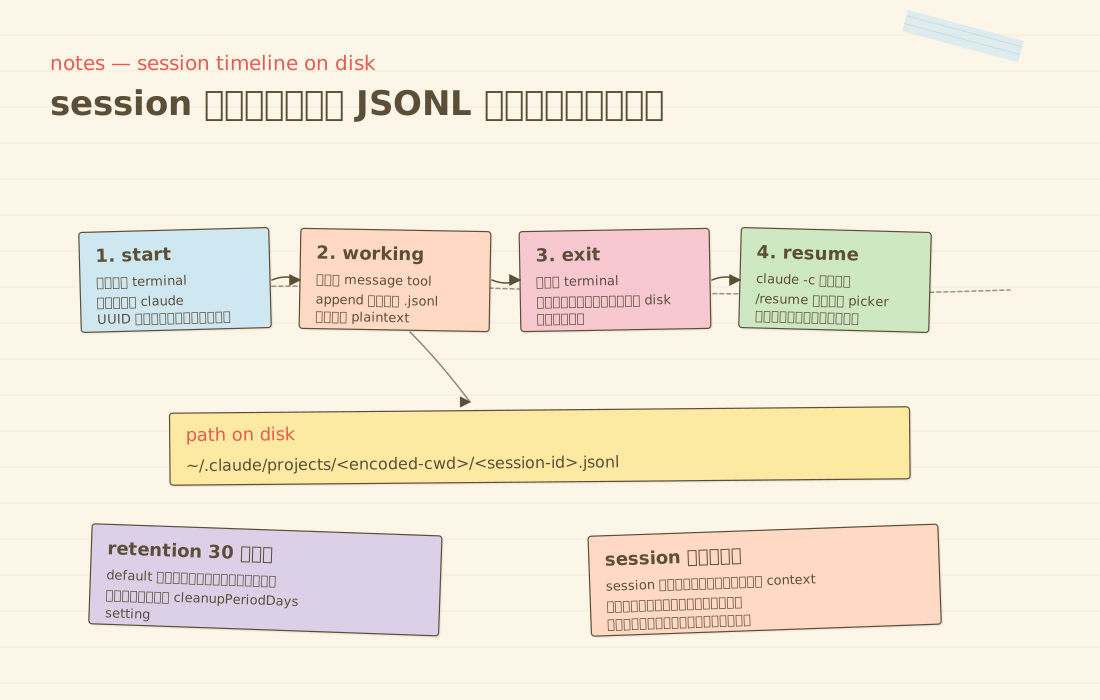
ตามเอกสาร How Claude Code works Anthropic ระบุว่า ทุกข้อความ ทุกการเรียกใช้เครื่องมือ และทุกผลลัพธ์ที่เกิดขึ้น จะถูกบันทึกต่อท้าย (Append) ลงในไฟล์ Plaintext JSONL ภายใต้โฟลเดอร์ ~/.claude/projects/
โครงสร้างที่อยู่ไฟล์จะอยู่ในรูปแบบ:
~/.claude/projects/<encoded-cwd>/<session-id>.jsonl
โดย <encoded-cwd> คือชื่อไดเรกทอรีทำงานที่ถูกเข้ารหัส ส่วน <session-id> คือรหัสประจำตัวของเซสชันนั้นๆ คุณสามารถเปิดดูไฟล์เหล่านี้ได้โดยตรงด้วยคำสั่ง cat หรือโปรแกรม Text Editor ทั่วไป ซึ่งจะแสดงรายการเหตุการณ์เรียงตามลำดับเวลา
ข้อมูลเหล่านี้ไม่ได้เป็นเพียงแค่บันทึกประวัติเท่านั้น แต่ก่อนที่ Claude จะแก้ไขไฟล์ใดๆ ระบบจะทำการบันทึกภาพถ่ายสถานะของไฟล์ (Snapshot) ไว้ก่อนเสมอ เพื่อให้คุณสามารถย้อนกลับ (Rewind หรือ Revert) ไปยังสถานะก่อนหน้าได้ทันทีหากผลลัพธ์ไม่เป็นไปตามต้องการ
แต่ละ Session ทำงานเป็นอิสระจากกันอย่างสมบูรณ์ ทุกครั้งที่คุณเปิด Session ใหม่ Context Window จะเริ่มต้นจากความว่างเปล่าเสมอ ประวัติการสนทนาเดิมจะไม่ถูกดึงข้ามมา เว้นแต่ข้อมูลที่บันทึกไว้ใน Memory หรือไฟล์ CLAUDE.md
Context Window คือพื้นที่หน่วยความจำของเซสชันปัจจุบัน
Context Window เปรียบเสมือนพื้นที่หน่วยความจำชั่วคราว (Working Memory) ที่ Claude ใช้ประมวลผลคำตอบในแต่ละรอบ โดยขนาดเริ่มต้นสำหรับโมเดลส่วนใหญ่ในปัจจุบันอยู่ที่ 200K Tokens
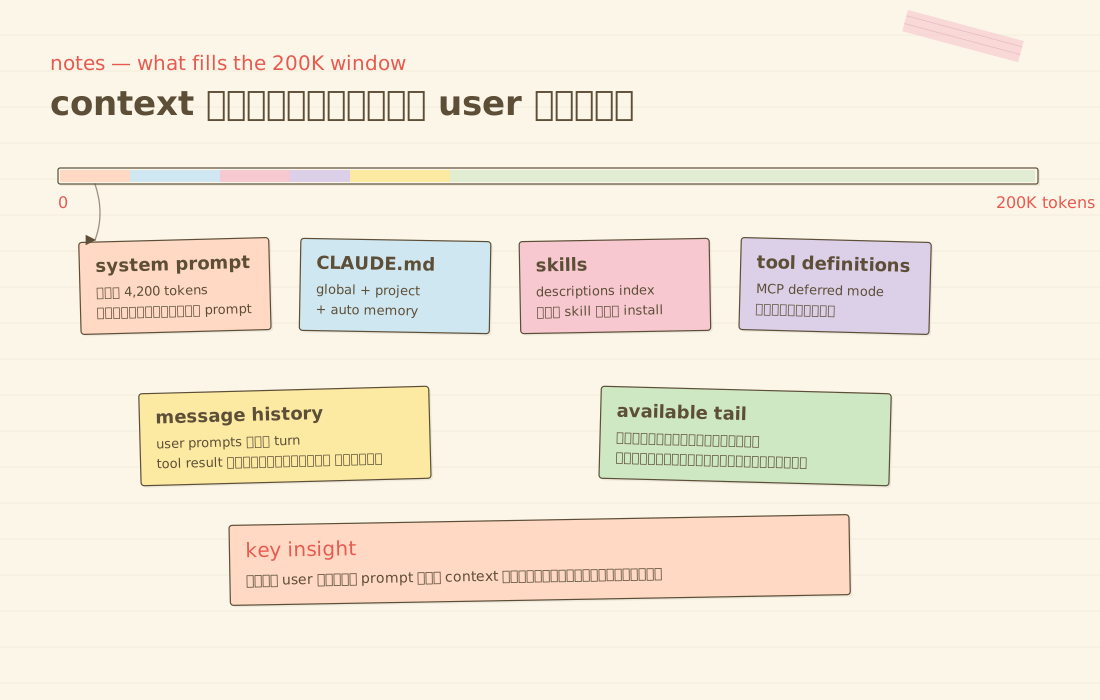
ตามเอกสาร Explore the context window เมื่อเริ่มเซสชันใหม่ พื้นที่ Context จะถูกจัดสรรให้กับข้อมูลส่วนกลางก่อนที่คุณจะพิมพ์ข้อความแรกเสมอ:
- System Prompt (ประมาณ 4,200 Tokens)
- ข้อมูลจากไฟล์ Auto Memory (
MEMORY.md) ของโปรเจกต์ - ข้อมูลสภาพแวดล้อมระบบ (OS, Shell, สถานะของ Git)
- ดัชนีเครื่องมือ MCP (โหลดแบบ Deferred Mode เป็นค่าเริ่มต้น)
- รายละเอียดของคำสั่งเฉพาะทาง (Skill Descriptions)
- คำสั่งระดับระบบ
~/.claude/CLAUDE.mdและไฟล์CLAUDE.mdในโปรเจกต์
สำหรับไฟล์ MEMORY.md และ CLAUDE.md ระบบจะโหลดข้อมูลเฉพาะ 200 บรรทัดแรก หรือขนาดไม่เกิน 25 KB เท่านั้น หากไฟล์มีความยาวเกินกว่านั้น ข้อมูลตั้งแต่บรรทัดที่ 201 จะไม่ถูกดึงเข้ามาใน Context เริ่มต้น
หากต้องการตรวจสอบปริมาณการใช้งาน Context ในเซสชันปัจจุบัน คุณสามารถพิมพ์คำสั่ง:
/context
ระบบจะแสดงแผนผังการใช้งานและคำแนะนำในการปรับแต่งพื้นที่ให้เห็นอย่างชัดเจน
กลไกอัตโนมัติเมื่อ Context ใกล้เต็ม
ก่อนที่คุณจะต้องสั่งจัดการด้วยตัวเอง Claude Code มีระบบบริหารจัดการ Context อัตโนมัติเมื่อข้อมูลเริ่มเข้าใกล้ขีดจำกัด
ลำดับการจัดการเริ่มต้นจากการล้างผลลัพธ์ของเครื่องมือรุ่นเก่า (Tool Outputs) ออกไปก่อน เนื่องจากผลลัพธ์จากการอ่านไฟล์หรือรันคำสั่ง Terminal มักใช้พื้นที่ขนาดใหญ่ หากพื้นที่ยังไม่เพียงพอ ระบบจึงจะเริ่มทำการสรุปเนื้อหาบทสนทนา (Summarize) ต่อไป
สิ่งที่ระบบจะรักษาไว้เสมอคือ ข้อความคำขอของผู้ใช้งานและชิ้นส่วนโค้ดสำคัญ ส่วนรายละเอียดปลีกย่อยหรือคำสั่งย่อยในช่วงต้นบทสนทนาอาจถูกบีบอัดให้สั้นลง นี่จึงเป็นเหตุผลว่าทำไมกฎเกณฑ์สำคัญของโปรเจกต์ควรถูกบันทึกไว้ใน CLAUDE.md แทนที่จะพิมพ์ทิ้งไว้ในแช็ต
การทำงานของคำสั่ง /compact
เมื่อคุณต้องการสั่งบีบอัดบทสนทนาด้วยตนเอง Slash commands reference ได้ระบุรูปแบบการใช้งานคำสั่ง /compact ไว้ 2 รูปแบบ:
/compact
/compact focus on the API changes
รูปแบบแรกคือการสรุปภาพรวมทั้งหมด ส่วนรูปแบบที่สองคือการระบุหัวข้อที่ต้องการให้เน้นเป็นพิเศษ เช่น หากกำลังแก้ปัญหาเกี่ยวกับ API คุณสามารถสั่งให้โฟกัสเฉพาะเรื่อง API เพื่อให้ระบบรักษาบริบทส่วนสำคัญไว้ครบถ้วนที่สุด
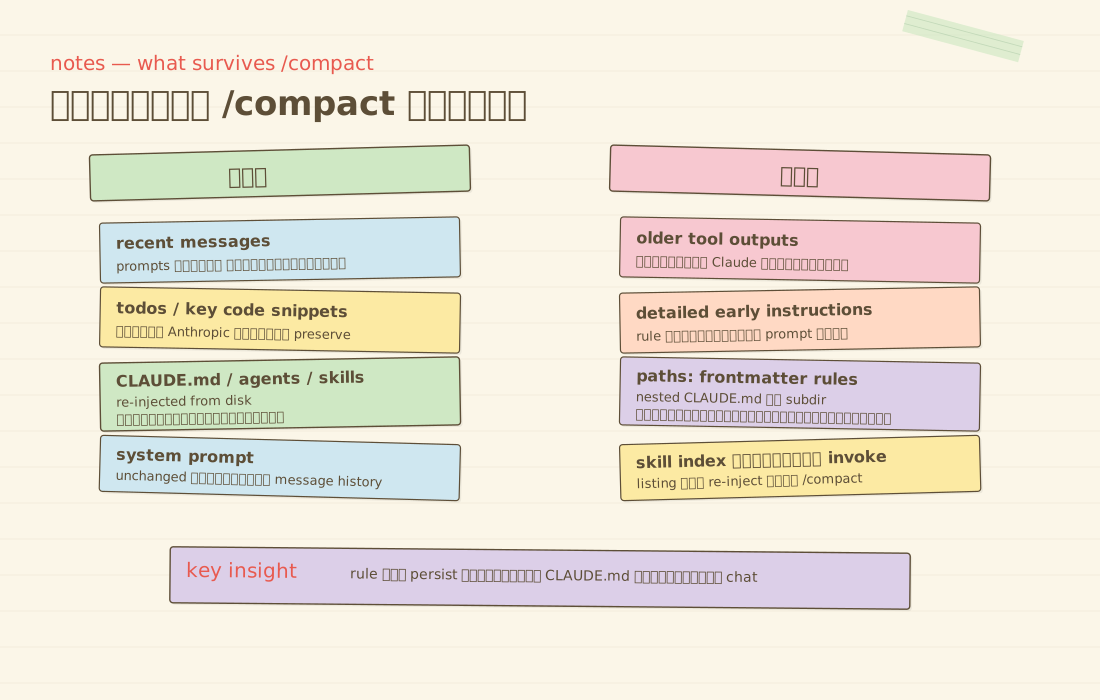
สถานะของข้อมูลแต่ละประเภทหลังจากการรันคำสั่ง /compact:
| Mechanism | After compaction |
|---|---|
| System prompt and output style | Unchanged; not part of message history |
| Project-root CLAUDE.md and unscoped rules | Re-injected from disk |
| Auto memory | Re-injected from disk |
Rules with paths: frontmatter | Lost until a matching file is read again |
| Nested CLAUDE.md in subdirectories | Lost until a file in that subdirectory is read again |
| Invoked skill bodies | Re-injected, capped at 5,000 tokens per skill and 25,000 tokens total; oldest dropped first |
| Hooks | Not applicable; hooks run as code, not context |
ข้อมูลที่มีสถานะ Re-injected from disk เช่น CLAUDE.md หลัก และ Auto Memory จะถูกอ่านซ้ำจากดิสก์ใหม่เสมอ จึงมั่นใจได้ว่าข้อมูลสำคัญจะไม่สูญหาย
คำสั่ง /clear ต่างจาก /compact อย่างไร
เอกสารทางการของ Anthropic สรุปความแตกต่างไว้อย่างชัดเจน:
คำสั่ง /clear (หรือชื่อเรียกอื่นคือ /reset และ /new) มีหน้าที่ในการเริ่มต้นบทสนทนาใหม่ด้วย Context ที่ว่างเปล่า แต่ไม่ได้เป็นการลบข้อมูลเซสชันเก่าออกจากเครื่อง ประวัติเดิมทั้งหมดยังคงบันทึกอยู่ในรูปแบบไฟล์ JSONL และสามารถเรียกกลับมาใช้งานได้เสมอผ่านคำสั่ง /resume
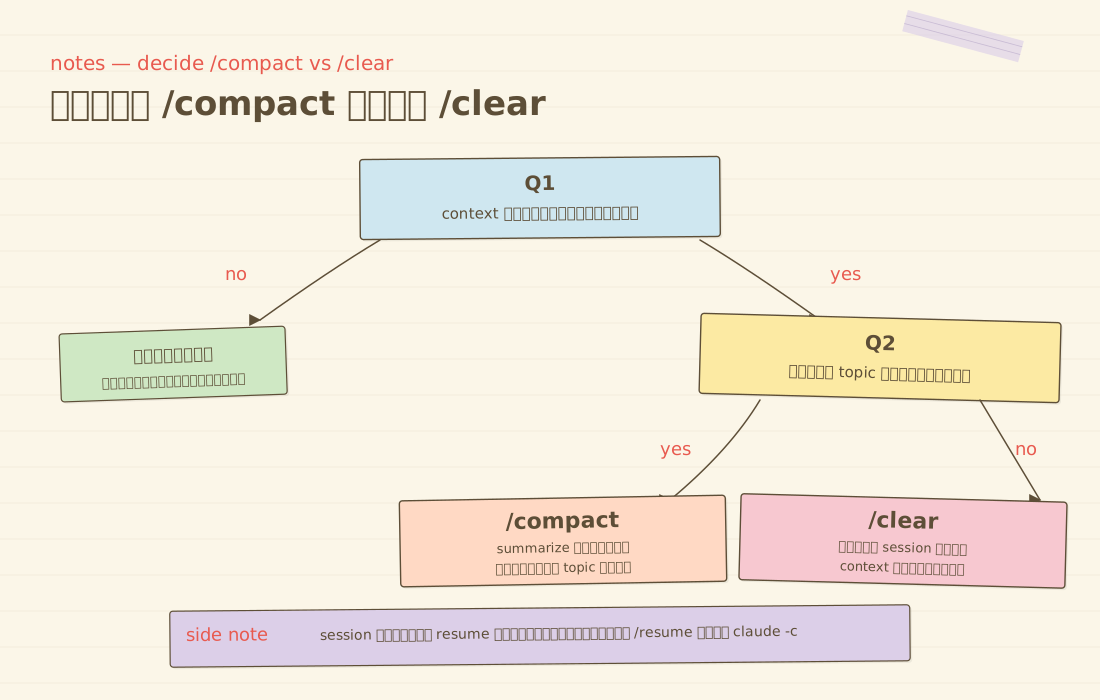
เกณฑ์ง่ายๆ ในการเลือกใช้:
- ใช้
/compactเมื่องานเดิมยังไม่เสร็จ เช่น กำลังแก้บั๊กจุดเดิม และต้องการให้ Claude ยังคงเข้าใจบริบทการทำงานที่คุยค้างไว้ - ใช้
/clearเมื่อเสร็จสิ้นหัวข้อเดิมและต้องการเริ่มงานใหม่ในโมดูลอื่น เพื่อคืนพื้นที่ Context ทั้งหมดให้สะอาดและพร้อมสำหรับหัวข้อถัดไป
เทคนิคขั้นสูงสำหรับการจัดการ Context
1. การใช้ Subagent เพื่อแยกบริบทการทำงาน
Subagent จะทำงานใน Context Window ของตัวเองแบบแยกส่วน เมื่อทำงานเสร็จสิ้นจะส่งกลับมาเฉพาะผลสรุปสั้นๆ เข้าสู่เซสชันหลัก
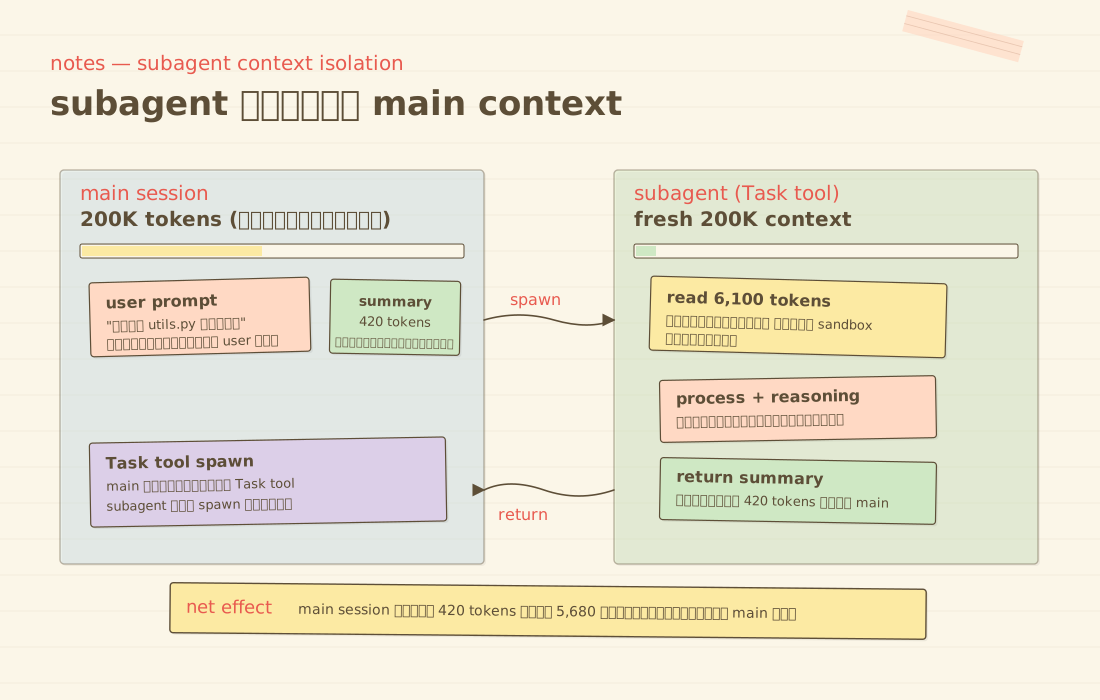
ตัวอย่างเช่น หากงานย่อยต้องอ่านเอกสารขนาด 6,100 Tokens แต่ Subagent สรุปเนื้อหากลับมาเหลือ 420 Tokens เซสชันหลักของคุณก็จะใช้พื้นที่เพิ่มเพียง 420 Tokens เท่านั้น ทำให้เหมาะอย่างยิ่งสำหรับการค้นหาข้อมูลหรือการอ่านไฟล์เอกสารขนาดใหญ่
2. ตัวเลือกขนาดบริบท 1M Context Tier
โมเดล Opus 4.7, Opus 4.6 และ Sonnet 4.6 รองรับ Context Window ขนาดใหญ่ถึง 1 ล้าน Tokens สำหรับโปรเจกต์ขนาดใหญ่ โดยผู้ใช้แผน Max, Team และ Enterprise จะได้รับการอัปเกรดอัตโนมัติ
คุณสามารถเลือกใช้งานได้โดยตรงผ่านคำสั่ง:
/model opus[1m]
/model sonnet[1m]
3. การกู้คืนและแยกแขนงเซสชัน (Resume and Fork)
คำสั่งที่มีประโยชน์สำหรับการจัดการเซสชันจาก Terminal:
claude -c
claude --continue
claude --resume
claude --session-id <UUID>claude -cหรือclaude --continueสำหรับทำงานต่อจากบทสนทนาล่าสุดในโฟลเดอร์ปัจจุบันทันทีclaude --resumeเปิดเมนูให้เลือกเซสชันย้อนหลังที่ต้องการทำงานต่อ- ตัวเลือก
--fork-sessionช่วยให้คุณแตกแขนง (Branch) การทำงานออกจากเซสชันเดิม เพื่อทดลองแนวทางใหม่โดยไม่ส่งผลกระทบต่อประวัติเดิม
สรุปแนวทางปฏิบัติหน้างาน
- หากต้องการทำงานต่อในประเด็นเดิม: ใช้คำสั่ง
/compactพร้อมระบุขอบเขตที่ต้องการเน้น - หากต้องการสลับไปทำฟีเจอร์ใหม่: ใช้คำสั่ง
/clearเพื่อรีเซ็ตพื้นที่บริบทให้พร้อม - หากมีงานอ่านเอกสารหรือค้นหาข้อมูลปริมาณมาก: มอบหมายให้ Subagent รับผิดชอบเพื่อไม่ให้เซสชันหลักบวม
- หากมีกฎเกณฑ์สำคัญของโปรเจกต์: บันทึกไว้ใน
CLAUDE.mdเสมอ
เมื่อคุณเข้าใจโครงสร้างการทำงานเบื้องหลังเหล่านี้ การจัดการ Context Window ก็จะไม่ใช่เรื่องที่ต้องเดาอีกต่อไป แต่เป็นเครื่องมือที่คุณสามารถควบคุมได้อย่างเต็มประสิทธิภาพในทุกโปรเจกต์
แหล่งอ้างอิง
ชอบเรื่องแนวนี้ มีอีบุ๊คฟรีให้อ่านต่อ
NotebookLM ฉบับเข้าใจง่าย โยนเอกสารให้ AI อ่าน แล้วได้สรุป พอดแคสต์ และคลังความรู้ส่วนตัว
กดสมัครแล้วเราจะส่งเทคนิค AI และของแจกใหม่ๆ ให้ทางอีเมล เลิกรับได้ตลอด
Claude Cowork · The Business Playbook
ฉบับภาษาไทย 15 บท เรียนรู้ผ่านโปรเจกต์จำลองต่อเนื่องทั้งเล่ม ตั้งแต่ตั้งค่า Workspace จัดการไฟล์ เชื่อมแอป ตั้งระบบอัตโนมัติ จนถึงสร้าง Plugin