Pre-warming prompt cache ของ Claude API ใช้ max_tokens 0 ตัด latency รอบแรกของ user
Anthropic เปิด max_tokens 0 เป็น API surface ทางการสำหรับ pre-warm prompt cache ก่อน user request แรกจะเข้ามา ตัด cache-miss latency ที่เกิดเวลา cache 5 นาทีหมดอายุ พร้อม pattern ใช้จริง pricing multiplier และ gotcha ที่ Anthropic เน้นในเอกสาร

ในเอกสารทางการของ Anthropic หัวข้อ Prompt Caching มีหัวข้อหนึ่งชื่อ Pre-Warming the Cache ที่ Dev หลายคนอาจมองข้าม แต่ความจริงนี่คือเทคนิคแก้ปัญหา Latency คลาสสิกของ Production App ที่รันบน Claude API ได้อย่างตรงจุด
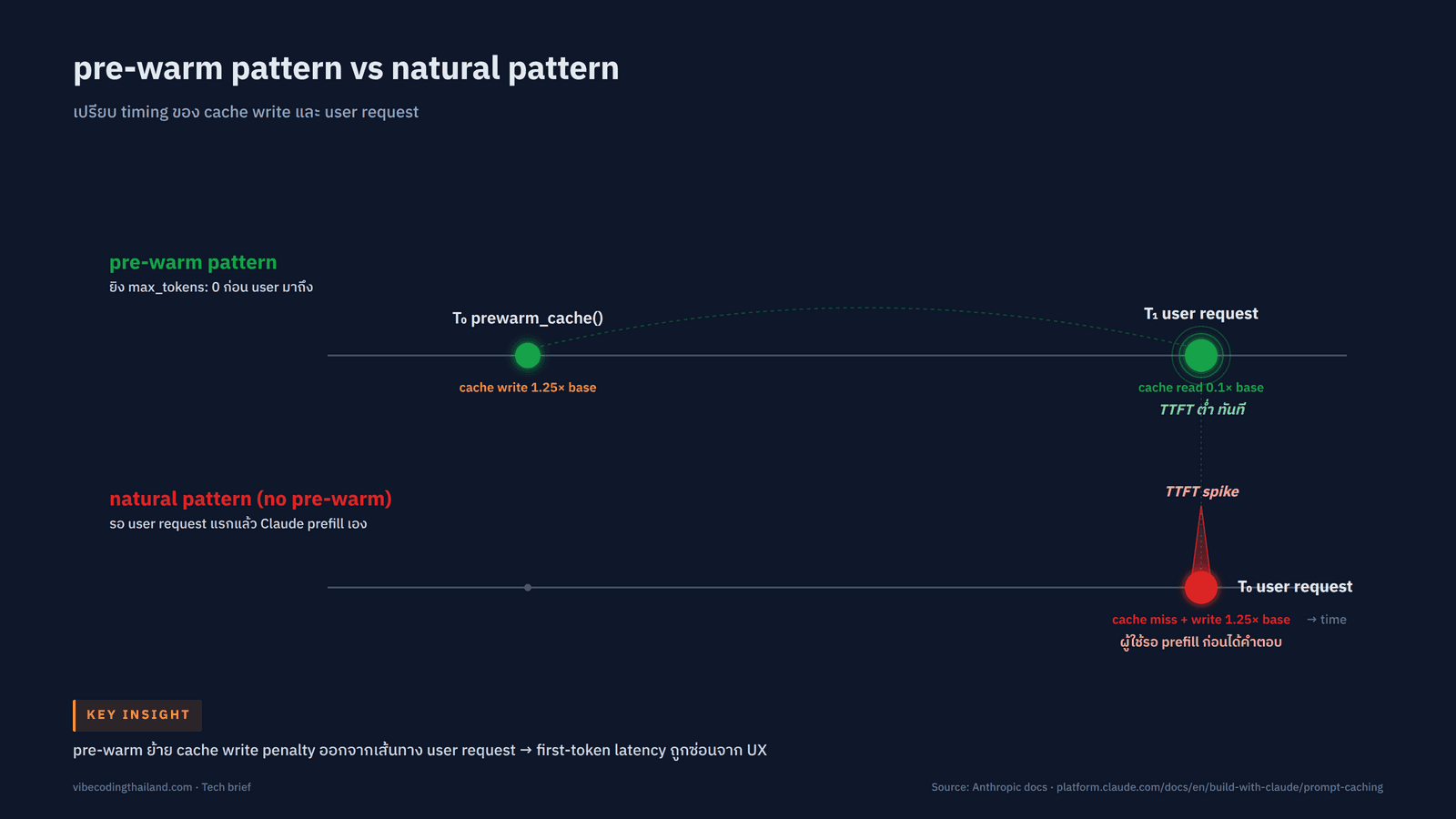
ปัญหาเดิมคือเมื่อ Cache หมดอายุ Request แรกที่ผู้ใช้งานส่งเข้ามาจะช้าผิดปกติ เพราะ Claude ต้อง Prefill ก้อน System Prompt ใหม่อีกรอบ ส่งผลให้ Time-to-First-Token (TTFT) พุ่งสูงเฉพาะรอบแรก ส่วน Request ถัดไปที่ยังอยู่ในกรอบเวลา TTL ถึงจะกลับมาเร็วตามปกติ
Anthropic เปิดตัว API Surface ทางการให้เราส่ง Request พร้อมพารามิเตอร์ max_tokens: 0 เพื่อโหลด System Prompt หรือ Tool Definitions เข้า Cache ล่วงหน้าก่อนที่ User Request แรกจะเข้ามาจริง โดย API จะประมวลผลช่วง Prefill Phase เต็มรูปแบบ เขียน Cache ที่ Breakpoint แล้วตอบกลับทันทีโดยไม่สร้าง Output ออกมาเลย เทคนิคนี้เข้ามาแทน Workaround แบบเดิมที่ต้องส่ง max_tokens: 1 แล้วทิ้ง Token นั้นไป เหมาะอย่างยิ่งกับระบบที่ต้องการความเร็วสูง เช่น Voice Agent, Chatbot บริการลูกค้า หรือระบบ Autocomplete
1. Prompt Cache ทำงานอย่างไร (ทบทวนก่อนเริ่ม Pre-Warming)
ก่อนจะทำความเข้าใจเรื่อง Pre-Warm เรามาทบทวนการทำงานของ Prompt Cache กันสั้นๆ Anthropic มีวิธีเปิดใช้งาน Cache 2 รูปแบบ คือ Automatic Caching และ Explicit Cache Breakpoints
แบบแรกคือ Automatic Caching เพียงแค่ใส่ cache_control ที่ Top-Level ของ Request ครั้งเดียว ระบบจะตั้ง Breakpoint ไว้ที่ Content Block สุดท้ายให้อัตโนมัติ ส่วนแบบหลังคือการกำหนด cache_control ลงใน Content Block ที่ต้องการด้วยตัวเอง ซึ่งตั้งได้สูงสุด 4 Breakpoints ต่อ 1 Request
ระบบ Cache จะอิง Prefix ของ Prompt ตามลำดับชั้น tools → system → messages หากมีการเปลี่ยนแปลงที่ระดับใด Cache ในระดับนั้นรวมถึงระดับที่อยู่ถัดไปจะถูก Invalidate ทั้งหมด ตัวอย่างเช่น ถ้าคุณแก้ไข Tool Definition (ไม่ว่าจะเป็น name, description หรือ parameter) ระบบจะ Invalidate ทั้ง Tools Cache, System Cache และ Messages Cache ไปพร้อมกัน แต่ถ้าเปลี่ยนเฉพาะค่า tool_choice จะส่งผลให้ Invalidate แค่ Messages Cache เท่านั้น
หัวใจสำคัญ 3 ข้อของระบบที่ต้องจำให้แม่นคือ: Cache Write จะเกิดขึ้นเฉพาะที่ตำแหน่ง Breakpoint เท่านั้น, Cache Read จะค้นหาย้อนกลับเพื่อหา Entry ที่ Request ก่อนหน้าเขียนไว้ และ Lookback Window มีขนาด 20 Blocks ต่อ Breakpoint หมายความว่าระบบ Cache ยึดตาม Entry ที่เคยบันทึกไว้ในรอบก่อนหน้า ไม่ใช่ก้อน Content ตามความเข้าใจของเรา หากวางตำแหน่ง Breakpoint ผิดที่ ระบบจะบันทึก Cache Entry ใหม่ทุก Request ส่งผลให้ไม่เกิด Cache Hit เลย
ตามค่าเริ่มต้น Cache มีอายุ (TTL) 5 นาที และจะต่ออายุใหม่ทันทีเมื่อมีการเรียกใช้งาน นอกจากนี้ Anthropic ยังรองรับ TTL 1 ชั่วโมง โดยคิดค่าบริการเขียน Cache เป็น 2 เท่าของ Base Input ผ่านคำสั่ง {"cache_control": {"type": "ephemeral", "ttl": "1h"}} (บน Amazon Bedrock ยังไม่รองรับ TTL 1 ชั่วโมง)
2. Pre-Warming คืออะไร และมีหลักการทำงานอย่างไร
Cache Pre-Warming คือการโหลด System Prompt หรือ Tool Definitions เข้า Cache ก่อนที่ Request จากผู้ใช้งานจริงจะส่งเข้ามา เพื่อตัดปัญหา Latency จาก Cache Miss ในรอบแรก กลไกคือการยิง Request ที่ตั้งค่า max_tokens: 0 ระบบจะรันกระบวนการ Prefill เต็มรูปแบบ บันทึก Cache ในทุกตำแหน่งที่มี cache_control Breakpoint แล้ว Return ผลลัพธ์กลับมาทันทีโดยไม่มีการ Generate ข้อความตอบกลับ
Response จาก Pre-Warm Request จะมีรูปแบบเฉพาะตามที่เอกสารระบุไว้ คือ content จะเป็น Array ว่าง, stop_reason มีค่าเป็น "max_tokens" และมี Object usage ส่งกลับมาครบถ้วน รวมถึงฟิลด์ cache_creation_input_tokens ที่ระบุจำนวน Token ที่เพิ่งบันทึกลง Cache
import anthropic

client = anthropic.Anthropic()

prewarm = client.messages.create(
    model="claude-opus-4-7",
    max_tokens=0,
    system=[
        {
            "type": "text",
            "text": "You are an expert software engineer with deep knowledge of distributed systems...",
            "cache_control": {"type": "ephemeral"},
        }
    ],
    messages=[{"role": "user", "content": "warmup"}],
)
print(prewarm.stop_reason)  # "max_tokens"
print(prewarm.content)      # []
print(prewarm.usage) # cache_creation_input_tokens > 0ตัวอย่าง Response JSON ที่ได้จากการทำ Pre-Warm ก้อน System Prompt ขนาดประมาณ 5,000 Tokens:
{
  "id": "msg_01XFDUDYJgAACzvnptvVoYEL",
  "content": [],
  "stop_reason": "max_tokens",
  "usage": {
    "input_tokens": 8,
    "cache_creation_input_tokens": 5120,
    "cache_read_input_tokens": 0,
    "cache_creation": {
      "ephemeral_5m_input_tokens": 5120,
      "ephemeral_1h_input_tokens": 0
    },
    "output_tokens": 0
  }
}จุดสำคัญคือ การ Pre-Warm ยังคงมีค่าบริการ Cache Write ตามปกติเหมือนการเขียน Cache ทั่วไป แต่จะไม่มีค่าใช้จ่ายในส่วนของ Output Token เลยเพราะ Output มีค่าเป็น 0 และเมื่อมี Request จริงเข้ามาภายในช่วงเวลา TTL ระบบจะอ่าน Prefix จากก้อนที่ Pre-Warm ไว้ในอัตราค่าบริการ Cache Read เพียง 0.1 เท่าของ Base Input ตามตารางราคาของ Anthropic
สำหรับ Placeholder User Message เราสามารถใส่ข้อความอะไรก็ได้ที่ไม่ใช่ค่าว่าง เอกสารของ Anthropic ใช้คำว่า "warmup" เป็นตัวอย่าง ระบบจะอ่านข้อความนี้ระหว่างทำ Prefill แต่จะไม่ตอบกลับ เพราะติดเงื่อนไข max_tokens: 0
3. Pattern การใช้งานจริง: แยกฟังก์ชัน Prewarm และ Respond
แนวทางปฏิบัติที่ดีคือการแยกฟังก์ชัน prewarm_cache() ออกจาก respond() ให้ชัดเจน โดยแชร์ตัวแปร SYSTEM_PROMPT ร่วมกัน และวาง cache_control Breakpoint ไว้ที่ Block สุดท้ายของ System Prompt (ไม่ใช่ที่ User Message)
import anthropic

client = anthropic.Anthropic()

SYSTEM_PROMPT = [
    {
        "type": "text",
        "text": "You are an expert software engineer with deep knowledge of distributed systems...",
        "cache_control": {"type": "ephemeral"},
    }
]


def prewarm_cache() -> None:
    """Call this at application startup or on a scheduled interval."""
    client.messages.create(
        model="claude-opus-4-7",
        max_tokens=0,
        system=SYSTEM_PROMPT,
        messages=[{"role": "user", "content": "warmup"}],
    )


def respond(user_message: str) -> anthropic.types.Message:
    """The real user request; benefits from a warm cache."""
    return client.messages.create(
        model="claude-opus-4-7",
        max_tokens=1024,
        system=SYSTEM_PROMPT,
        messages=[{"role": "user", "content": user_message}],
    )


# Warm the cache before any user traffic arrives.
prewarm_cache()

# Later, when the user submits a message, the system-prompt prefix is already cached.
response = respond("How do I implement a binary search tree?")
print(response.content[0].text)สำหรับฝั่ง TypeScript สามารถใช้ผ่าน @anthropic-ai/sdk ด้วยโครงสร้างข้อมูลเดียวกัน:
import Anthropic from "@anthropic-ai/sdk";

const client = new Anthropic();

const prewarm = await client.messages.create({
  model: "claude-opus-4-7",
  max_tokens: 0,
  system: [
    {
      type: "text",
      text: "You are an expert software engineer with deep knowledge of distributed systems...",
      cache_control: { type: "ephemeral" }
    }
  ],
  messages: [{ role: "user", content: "warmup" }]
});
console.log(prewarm.stop_reason); // "max_tokens"
console.log(prewarm.content); // []จังหวะที่เหมาะสมในการเรียกใช้ prewarm_cache() คือช่วง Application Startup หรือรันผ่าน Scheduled Cron Job ให้ถี่กว่ารอบของ TTL เล็กน้อย หากใช้ Default TTL 5 นาที ควรยิง Pre-Warm ซ้ำทุกๆ ไม่เกิน 5 นาที โดยนับเวลาจากรอบ Refresh ล่าสุด ไม่ใช่เวลาตอนเริ่มสร้าง Application แต่หากระบบมีช่วงว่างระหว่าง Request นานกว่านั้น แนะนำให้ขยับไปใช้ TTL 1 ชั่วโมงแทน
4. โครงสร้างราคาและการตรวจสอบผ่าน Usage Field
ตามโครงสร้างราคาของ Anthropic ระบบ Prompt Cache คิดค่าบริการเป็นสัดส่วนเทียบกับ Base Input ดังนี้:
| ประเภทการทำงาน | อัตราส่วน | ตัวอย่างราคา Sonnet 4.6 (Base 3 USD ต่อ 1 ล้าน Tokens) |
|---|---|---|
| 5-minute Cache Write | 1.25 เท่า | 3.75 USD ต่อ 1 ล้าน Tokens |
| 1-hour Cache Write | 2.0 เท่า | 6.00 USD ต่อ 1 ล้าน Tokens |
| Cache Read และ Refresh | 0.1 เท่า | 0.30 USD ต่อ 1 ล้าน Tokens |
รายละเอียดราคาของแต่ละโมเดล (Base / 5m Write / 1h Write / Cache Read / Output ต่อ 1 ล้าน Tokens):
- Claude Opus 4.7, 4.6, 4.5: 5 / 6.25 / 10 / 0.50 / 25 USD
- Claude Sonnet 4.6, 4.5: 3 / 3.75 / 6 / 0.30 / 15 USD
- Claude Haiku 4.5: 1 / 1.25 / 2 / 0.10 / 5 USD
สัดส่วนราคาเหล่านี้สามารถใช้ร่วมกับส่วนลดอื่นๆ เช่น Batch API Discount ได้ตามปกติ
เราสามารถตรวจสอบสถานะการทำงานของ Cache ในแต่ละ Request ได้จาก Object usage ใน Response (หรือจาก Event message_start เมื่อใช้งาน Streaming) โดยมีฟิลด์หลัก 3 ตัว:
cache_creation_input_tokens: จำนวน Token ที่เขียนลง Cache ในรอบนี้ (Cache Write)cache_read_input_tokens: จำนวน Token ที่ดึงมาจาก Cache เดิม (Cache Hit)input_tokens: จำนวน Token ที่อยู่หลัง Breakpoint สุดท้าย ซึ่งไม่ได้นับรวมใน Cache
สูตรคำนวณ Total Input Tokens:
total_input_tokens = cache_read_input_tokens
                   + cache_creation_input_tokens
+ input_tokensตัวอย่างเช่น หาก Request มีเนื้อหาใน Cache เดิม 100,000 Tokens ไม่มีการเขียน Cache ใหม่ และมี User Message หลัง Breakpoint อีก 50 Tokens ผลลัพธ์ที่ได้จะเป็น cache_read_input_tokens = 100,000, cache_creation_input_tokens = 0 และ input_tokens = 50 รวมเป็น Token ที่ประมวลผลทั้งหมด 100,050 Tokens
5. เกณฑ์ขั้นต่ำของ Token และข้อจำกัดที่ควรรู้
Anthropic กำหนดจำนวน Token ขั้นต่ำที่จะสามารถบันทึกลง Cache ได้แยกตามโมเดลดังนี้:
| โมเดล | จำนวน Token ขั้นต่ำที่รองรับ Cache |
|---|---|
| Claude Opus 4.7 / 4.6 / 4.5 และ Claude Mythos Preview | 4,096 Tokens |
| Claude Sonnet 4.6 / 4.5 / Opus 4.1 / Opus 4 / Sonnet 4 | 1,024 Tokens |
| Claude Haiku 4.5 | 4,096 Tokens |
| Claude Haiku 3.5 (เฉพาะบน Vertex AI) | 2,048 Tokens |
หาก Prompt มีความยาวไม่ถึงเกณฑ์ขั้นต่ำ ระบบจะประมวลผล Request ตามปกติแต่จะไม่บันทึกลง Cache เลย โดยไม่มี Error แจ้งเตือน วิธีเช็คคือตรวจสอบค่า cache_creation_input_tokens ใน Response ถ้าได้ค่าเป็น 0 พร้อมกับ cache_read_input_tokens เท่ากับ 0 แสดงว่า Prompt ยังสั้นกว่าเกณฑ์ขั้นต่ำ
นอกจากนี้ การตั้งค่า max_tokens: 0 จะเกิด invalid_request_error ทันทีหากใช้งานร่วมกับฟีเจอร์ต่อไปนี้ เพราะฟีเจอร์เหล่านี้จำเป็นต้องมีการสร้าง Output:
stream: true- Extended Thinking (
thinking.type: "enabled") - Structured Outputs (
output_config.format) tool_choice: {"type": "tool", ...}หรือ{"type": "any"}
การส่ง max_tokens: 0 บน Message Batches API จะไม่สามารถใช้งานได้เช่นกัน เนื่องจากงานประเภท Batch ไม่ได้เน้นเรื่อง Time-to-First-Token และ Cache Entry ที่สร้างระหว่างรัน Batch อาจหมดอายุไปก่อนที่ Request ถัดไปจะเริ่มทำงาน
6. ข้อควรระวัง (Gotchas) ที่พบบ่อย
จุดที่อาจทำให้การทำ Pre-Warm ล้มเหลวโดยไม่มี Error แจ้งเตือน ซึ่งควรตรวจสอบให้ดีก่อนขึ้นระบบจริง:
วางตำแหน่ง Breakpoint ผิดที่: หาก Prompt มี Static System Context อยู่ใน Block 1 ถึง 5 และ Block 6 เป็น Context เฉพาะของแต่ละ Request ที่มี Timestamp หรือข้อความใหม่ การใส่ cache_control ที่ Block 6 จะทำให้ Hash ของ Prefix เปลี่ยนไปทุกครั้ง ส่งผลให้ระบบสร้าง Cache Entry ใหม่ตลอดเวลาและไม่เกิด Cache Hit เลย ทางแก้คือเลื่อน Breakpoint มาไว้ที่ Block 5 ซึ่งเป็น Block สุดท้ายที่ไม่เปลี่ยนแปลง
ห้ามใช้ Automatic Caching ร่วมกับ Pre-Warm: โหมด Automatic จะวาง Breakpoint ไว้ที่ Block สุดท้ายโดยอัตโนมัติ ซึ่งในกรณีของ Pre-Warm คือ Placeholder User Message (เช่น "warmup") ทำให้ Cache Key ผูกอยู่กับข้อความ Placeholder และเมื่อ Request จริงเข้ามาด้วยข้อความที่ต่างออกไป จะส่งผลให้เกิด Cache Miss ทุกครั้ง ดังนั้นการทำ Pre-Warm ต้องใช้ Explicit Cache Breakpoint เสมอ
ตรวจสอบ Token Threshold สม่ำเสมอ: หาก System Prompt สั้นกว่าเกณฑ์ เช่น ไม่ถึง 4,096 Tokens สำหรับ Opus 4.7 ระบบจะทำงานได้ตามปกติแต่ cache_creation_input_tokens จะเป็น 0 เสมอ ทำให้การ Pre-Warm ไม่ได้ผลจริง แม้ Logs จะดูเหมือนผ่านก็ตาม ต้องคอยตรวจสอบฟิลด์นี้ใน Response เสมอ
ระวังเรื่อง Concurrent Requests ตอนเริ่มต้น: Cache Entry จะพร้อมใช้งานหลังจาก Response แรกเริ่ม Streaming เท่านั้น หากแอปพลิเคชันยิง Request เข้ามาพร้อมกันเป็นจำนวนมากตอนเริ่มระบบ Request แรกจะทำหน้าที่เขียน Cache แต่ Request อื่นที่เข้ามาขนานกันจะมองไม่เห็น Cache Entry นั้นและต้องเสียค่าเขียน Cache ซ้ำซ้อน ทางแก้คือรอให้ Response จาก Pre-Warm ส่งกลับมาให้เสร็จก่อน แล้วจึงค่อยเปิดรับ Request จากผู้ใช้งานจริง
การแยก Cache ตาม Workspace (Workspace Isolation): ตั้งแต่วันที่ 5 กุมภาพันธ์ 2026 ระบบ Prompt Cache บน Claude API, Claude Platform on AWS และ Microsoft Foundry (Beta) ปรับการทำงานจากการแยกตามองค์กร (Org-level) มาเป็นการแยกตาม Workspace (Workspace-level) ส่วน Bedrock และ Vertex AI ยังคงแยกตามระดับองค์กรเช่นเดิม ระบบที่มีการใช้งานแบบ Multi-workspace จึงต้องวางแผนการ Cache ให้สอดคล้องกัน เพราะ Cache จะไม่แชร์ข้าม Workspace อีกต่อไป
ข้อควรจำเพิ่มเติม: การเปลี่ยนค่า tool_choice จะ Invalidate Messages Cache เสมอแม้ Tools และ System จะเหมือนเดิม, การเพิ่มหรือลบรูปภาพในตำแหน่งใดก็ตามจะ Invalidate Messages Cache เช่นกัน และการทำ JSON Serialization ในบางภาษา เช่น Swift หรือ Go ที่ลำดับ Key ของ tool_use Content Block ไม่คงที่ อาจทำให้ Hash เปลี่ยนแปลงได้ จึงควรจัดเรียง Key ให้คงที่เสมอ
7. เมื่อไหร่ควรทำ Pre-Warm และเมื่อไหร่ปล่อยให้ Cache ตามธรรมชาติ
การเลือกว่าควรทำ Pre-Warm หรือไม่ ขึ้นอยู่กับพฤติกรรม Traffic ของระบบ:
| ปัจจัย | Natural Cache Hit (ตามธรรมชาติ) | Explicit Pre-Warming |
|---|---|---|
| Latency รอบแรกของผู้ใช้งาน | สูง เพราะต้องรอทำ Prefill ใหม่ทั้งก้อน | ต่ำ เพราะเกิด Cache Hit ได้ทันที |
| ช่วงเวลาที่บันทึก Cache | เกิดขึ้นตอนที่ Request แรกของผู้ใช้งานส่งเข้ามา | บันทึกเสร็จล่วงหน้าก่อนที่ผู้ใช้งานจะส่ง Request |
| ค่าใช้จ่ายส่วนเพิ่ม | ไม่มีค่าใช้จ่ายส่วนเกิน แต่ผู้ใช้งานต้องรอรอบแรก | เสียค่า Cache Write 1 ครั้งต่อรอบ TTL หากไม่มีผู้ใช้งานเข้ามาในรอบนั้นจะถือว่าเสียเปล่า |
| ความเหมาะสม | เหมาะกับระบบที่มี Traffic สม่ำเสมอ (Cache Refresh ฟรีต่อเนื่อง) | เหมาะกับระบบที่มี Traffic เข้ามาเป็นช่วงๆ หลังระบบพักการทำงาน |
| การติดตั้งใช้งาน | ไม่ต้องเขียนโค้ดเพิ่มเติม | เพิ่ม Startup Hook หรือตั้ง Cron ยิง max_tokens: 0 |
หลักการพิจารณาเบื้องต้น: หากระบบมี Request เข้ามาสม่ำเสมอตลอดเวลาโดยเว้นช่วงไม่เกิน 5 นาที ไม่จำเป็นต้องทำ Pre-Warm เพราะระบบจะ Refresh Cache ให้อัตโนมัติอยู่แล้ว แต่หาก Request เว้นช่วงห่างกันระหว่าง 5 นาทีถึง 1 ชั่วโมง สามารถเลือกได้ว่าจะปรับไปใช้ TTL 1 ชั่วโมง หรือตั้งเวลาทำ Pre-Warm ทุก 5 นาที โดยคำนวณเปรียบเทียบค่าใช้จ่าย Cache Write กับความถี่ของ Traffic จริง สำหรับระบบที่ผู้ใช้งานจะเข้ามาพร้อมกันจำนวนมากหลังช่วงเวลาพัก เช่น เปิดทำการตอนเช้า การทำ Pre-Warm ก่อนล่วงหน้าจะช่วยให้ประสบการณ์ใช้งานรอบแรกราบรื่นที่สุด
8. เลิกใช้ Workaround เก่า max_tokens: 1
ก่อนที่ Anthropic จะรองรับ max_tokens: 0 อย่างเป็นทางการ หลายทีมเลือกใช้วิธีส่ง max_tokens: 1 แล้วตัดทิ้ง Output Token นั้น แต่การเปลี่ยนมาใช้ max_tokens: 0 เป็นแนวทางที่ดีกว่าด้วยเหตุผล 3 ข้อ: ระบบไม่ต้องสร้างข้อความตอบกลับทำให้ไม่มี Token ส่วนเกินหลงเหลือ, ไม่คิดค่าใช้จ่ายในส่วนของ Output Token เลย และแสดงเจตนาของ Request ชัดเจนว่าเป็นงานทำ Warm Cache
หากในโค้ดเบสเดิมของคุณยังคงใช้เทคนิค max_tokens: 1 อยู่ แนะนำให้ปรับเปลี่ยนมาใช้ max_tokens: 0 ตามมาตรฐานใหม่ เพื่อประหยัดค่าใช้จ่ายและใช้งาน API Surface ทางการที่ระบบซัพพอร์ตอย่างเต็มรูปแบบ
สรุป
การทำ Pre-Warming ด้วย max_tokens: 0 ช่วยเปลี่ยนช่วงเวลาการบันทึก Cache จาก "ตอนที่ผู้ใช้งานคนแรกเข้ามา" ไปเป็น "เตรียมพร้อมไว้ก่อนล่วงหน้า" ช่วยลดค่า TTFT ใน Request แรกได้อย่างชัดเจน เหมาะอย่างยิ่งกับระบบที่ต้องการความเร็วสูงและมีทราฟฟิกเข้ามาเป็นรอบๆ
สิ่งที่ต้องให้ความสำคัญคือการวาง Explicit Cache Breakpoint บน Content Block ที่ไม่เปลี่ยนแปลงข้าม Request หลีกเลี่ยงการใช้ Automatic Caching ร่วมกับ Pre-Warm และตรวจสอบความยาวของ Token ให้ผ่านเกณฑ์ขั้นต่ำของแต่ละโมเดล (เช่น 4,096 Tokens สำหรับ Opus 4.7 และ Haiku 4.5) เพื่อให้ระบบทำงานได้อย่างสมบูรณ์
ชอบเรื่องแนวนี้ มีอีบุ๊คฟรีให้อ่านต่อ
Vibe Coding สำหรับคนไม่ใช่โปรแกรมเมอร์ ใช้ Claude Code สร้าง landing page, mini app และ prototype จริงโดยไม่ต้องเขียนโค้ด
กดสมัครแล้วเราจะส่งเทคนิค AI และของแจกใหม่ๆ ให้ทางอีเมล เลิกรับได้ตลอด
Vibecoding · The Developer's Playbook

ฉบับภาษาไทย 10 บท พา dev สร้าง Personal Finance Tracker (LINE OA + AI จัดหมวดอัตโนมัติ) ตั้งแต่โครงโปรเจกต์บรรทัดแรกจนแอปทำงานจริงบน server